Bootstrapping a Factory That Builds Itself

Building a multi-agent software factory with Claude — Part 3 of 3
In Part 1, we designed a multi-agent software factory called halalifarm. In Part 2, we locked down the architectural decisions that needed to be right before writing code. Now we build it.
The goal: a Go CLI called halalifarm (aliased to hf) that can initialize a factory, register projects, switch between them, and track costs. The agents aren’t connected to the LLM APIs yet — that’s the next milestone. But the entire skeleton needs to be solid: the types, the state machine, the DAG, the ledger, the registry. Everything the agents will eventually operate on.
Why Go?
A few reasons fell out of the design conversation:
- Single binary, no runtime dependencies. I don’t want to debug Node version conflicts when I’m trying to ship a family cookbook app.
- Goroutines for future parallelism. When the DAG says two tasks are independent, spawning them concurrently is trivial.
- The Anthropic SDK exists for Go. (And so do OpenAI and Gemini SDKs.) The provider interface maps cleanly.
- I already work in Go. Using a familiar language for the orchestration layer means I can focus on the hard problems (agent coordination, context management) instead of fighting syntax.
A Note on hf
I wanted hf as the CLI shorthand. Quick search revealed that Hugging Face recently claimed that name for their CLI. Rather than fight it, the binary is named halalifarm and I alias it in my shell:
| |
No conflict. If I ever need Hugging Face’s CLI, it’s still available as huggingface-cli.
Project Structure
halalifarm/
├── cmd/halalifarm/        # CLI entry point
│   └── main.go
├── internal/
│   ├── agent/             # Agent persona loading
│   ├── config/            # Factory configuration
│   ├── factory/           # Wires everything together
│   ├── ledger/            # Token usage + cost tracking
│   ├── message/           # Append-only agent communication
│   ├── orchestrator/      # Task routing (future)
│   ├── project/           # Project registry
│   ├── provider/          # LLM provider interface
│   └── task/              # State machine + DAG
├── agents/                # Agent definitions (JSON)
│   └── pm.json
├── templates/             # Project scaffolding
│   └── project-brief.md
└── projects/              # Registry storage
    └── registry.json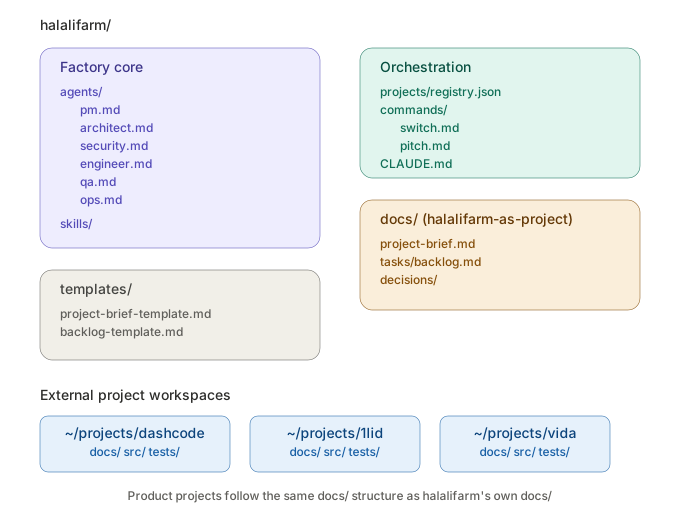
The internal/ layout follows standard Go conventions — each package has a single responsibility. The factory package is the glue that ties them together.
The Core Types
Task + State Machine
Every unit of work is a Task. The state machine from Part 2 is encoded as a transition table:
| |
The TransitionTo method on Task enforces this — you literally cannot put a task into an invalid state. It also handles side effects: transitioning to in_progress records the start time, transitioning via rework increments the rework counter and auto-escalates to needs_human if the cap is hit.
| |
The DAG
The DAG is minimal — it wraps a map of tasks and provides three operations:
Ready(): Returns all tasks whose dependencies are complete and that are currently pending. This is what the orchestrator calls to find work.PropagateFailure(id): When a task fails, this cascadesblockedstatus to everything downstream.Validate(): Checks for missing dependency references and cycles before any work starts.
Cycle detection uses a standard DFS with a “currently in stack” tracker. If we visit a node that’s already in the current DFS path, we’ve found a cycle.
The Provider Interface
| |
Four methods. Complete does the actual LLM call. EstimateCost predicts the cost before sending (so the budget gate can block expensive calls). CostPer1KTokens provides pricing data for the ledger.
No concrete providers are implemented yet — that’s the next step. But the interface is locked, which means everything else can be built against it.
The Token Ledger
Every LLM call gets a ledger entry with full context layer breakdowns:
| |
The CheckBudget method runs before every call, checking daily limits, per-task limits, and per-project monthly limits. If any limit would be exceeded, it returns an error and the call doesn’t happen.
The Message Log
Append-only JSONL. The Append method opens the file in append mode, writes one line, and closes. Concurrent-safe by nature — appends are atomic on most filesystems, and we add a mutex for in-memory consistency.
Filtering methods — ForTask, ForAgent, Recent — let the context assembly layer pull exactly the messages an agent needs.
The Project Registry
A JSON file mapping project names to their metadata: workspace path, type (product vs. factory-meta), status, and timestamps. The Switch method changes the active project. The Add method registers a new one and saves immediately.
The CLI
The entry point is a hand-rolled command router (no dependency on cobra or urfave/cli — fewer dependencies means fewer things to break):
| |
hf init
Creates the factory directory structure, writes a default project brief template, and — here’s the self-referential part — registers halalifarm itself as a factory-meta project:
$ hf init
✓ Initialized halalifarm factory at /home/user/halalifarm
  halalifarm registered as factory-meta project
From the very first command, the factory is a project in its own registry.
hf pitch
Takes a description, derives a project name, scaffolds the workspace, stamps in the project brief template with the date filled in, and auto-switches to the new project:
$ hf pitch "family cookbook app"
📋 Pitching: "family cookbook app"
   Project name: family-cookbook-app
✓ Project created and activated
  Workspace: ~/projects/family-cookbook-app
  Brief:     ~/projects/family-cookbook-app/docs/project-brief.md
Right now it just creates the skeleton. Once the Anthropic provider is wired up, this command will invoke the PM agent to actually flesh out the brief — ask clarifying questions, consult the Architect and Security agents, and produce a task backlog.
hf projects
Lists everything in the registry with the active project marked:
$ hf projects
  halalifarm               factory-meta drafting   $0.00
▸ family-cookbook-app product      drafting   $0.00
hf cost
Queries the token ledger with optional filters:
$ hf cost --today
$ hf cost --project family-cookbook-app
Currently reports “No LLM calls recorded yet” — which is accurate! Once providers are connected, this becomes the dashboard for understanding where your money is going.
End-to-End Test
Here’s the full sequence running against a clean directory:
$ mkdir test-factory && cd test-factory
$ hf init
✓ Initialized halalifarm factory at /tmp/test-factory
  halalifarm registered as factory-meta project

$ hf status
Project:   halalifarm
Type:      factory-meta
Status:    drafting
Workspace: /tmp/test-factory
Cost (month): $0.00
Cost (today): $0.00

$ hf pitch "family cookbook app"
📋 Pitching: "family cookbook app"
   Project name: family-cookbook-app
✓ Project created and activated

$ hf projects
  halalifarm               factory-meta drafting   $0.00
▸ family-cookbook-app product      drafting   $0.00

$ hf switch halalifarm
✓ Switched to project: halalifarm

$ hf agents
  Project Manager      pm           anthropic/claude-sonnet-4-20250514
It works. The factory initializes, registers itself, creates projects, scaffolds workspaces, switches context, and reports status. All in ~1,560 lines of Go across 10 source files.
What’s Next
The skeleton is done. The immediate next steps are:
- Implement the Anthropic provider — the first concrete
Providerimplementation. Once this works,hf pitchwill actually call the PM agent and get a real project brief back. - Wire the orchestrator — the component that reads the task backlog, finds ready tasks from the DAG, assembles context, dispatches to the right agent, and records the result.
- Onboard a real project — switch to one of my existing projects (probably the simplest one) and let the PM agent try to create a brief and task backlog from what already exists.
After that: add the remaining agents (Architect, Security, Engineer, QA, Ops), implement the review checkpoint loop, and start running real tasks.
Reflections on Building With Claude
Three things stood out from this process:
The conversation format is underrated for design. I didn’t sit down with a blank architecture doc. I described what I wanted, Claude sketched it back, I pushed back, we iterated. The friction of explaining your half-formed idea to something that responds with structure forces clarity faster than thinking alone.
The diagrams mattered more than I expected. Seeing the factory architecture, the state machine, and the cost flow as actual visuals — inline, in real time, as we discussed them — caught misunderstandings that would have survived pages of text. When I said “the agents share memory” and Claude drew the architecture, I could immediately see whether it matched what I meant.
Transparency is fine. I built this with an AI. The design is better for it. The code compiles and runs. I don’t see a reason to pretend otherwise, and I think the dev community is past the point where admitting you used AI tools is controversial. The interesting question isn’t “did you use AI?” — it’s “how did you use it well?”
The full source code is available on GitHub. If you build something similar, I’d love to hear about it.