What If Your AI Agents Were a Consultancy?

Building a multi-agent software factory with Claude — Part 1 of 3
The Search for the “Software Factory”
I’ve been trying to wrap my head around how to get AI to code for me without it running away from me faster than I can chase. I’ve spent months circling the same idea: what if I could pitch a product idea to an AI team and have them plan, architect, build, and review it — like a real dev team, but one that lives in my terminal?
Not a single chatbot that writes code. A team. A Project Manager who breaks down the work. An Architect who designs the system. A Security Engineer who pokes holes in it. A Software Engineer who builds it. QA who makes sure it works. Ops who makes sure it ships.
Listening to Geoffrey Huntley (ralph/loom) and Steve Yegge (gastown) talk about their respective projects set my brain spinning. But I kept getting stuck on one thing: how do you tell a team of AI agents to build something that isn’t itself? I realized that building it from the ground up would be the only way to truly understand the mechanics and avoid the “chatbot loop” where the AI just goes around in circles.
The Spark: bdfinst’s Agentic Dev Team
I have a great deal of admiration and respect for Brian Finster’s work with minimumcd.org and elsewhere, so I look at his GitHub from time to time for inspiration. I stumbled across bdfinst/agentic-dev-team — a Claude Code plugin that adds a full persona-driven AI development team to any project.
It’s a pragmatic, well-designed system: an Orchestrator routes tasks, review checkpoints catch quality issues, and agents share memory through a file-based system. There’s also integration with Beads, a git-backed issue tracker that gives agents structured task context across sessions. Seeing how he structured those personas clicked open something I hadn’t been able to see before.
While a great inspiration, I felt like his project isn’t exacly what I was after. I wanted something that felt a little more autonomous. I don’t have just one project. I have several at various stages — a smartwatch app, a public health patient monitoring platform, a driver’s education app, a Hugo blog for a local hobby group, and more in the pipeline. Each one has its own tech stack, its own domain, its own set of problems. I needed a way to manage all of them from a central hub.
The Insight: The Factory Isn’t the Product
I opened up a chat and started a conversation with Claude about this software “consultancy” I was dreaming of. I was explaining my project — halalifarm — and Claude initially assumed it was the product I wanted the agents to build. I had to correct that:
“Actually, halalifarm is the software factory. The projects are things like [my smartwatch app], [my health platform], [my driver’s ed app]…”
That reframed everything. Halalifarm isn’t a product the agents build; it’s the firm that employs them. When I say “build the driver’s ed app,” the factory spins up a project context, navigates to that specific repo, and the agents do their work there.
The mental model finally locked in when Claude described it as a consultancy:
“Halalifarm is the firm. Your projects are the clients. Each client has its own folder, its own brief, its own backlog. The agents are the staff who move between clients but always know which client they’re currently working for.”
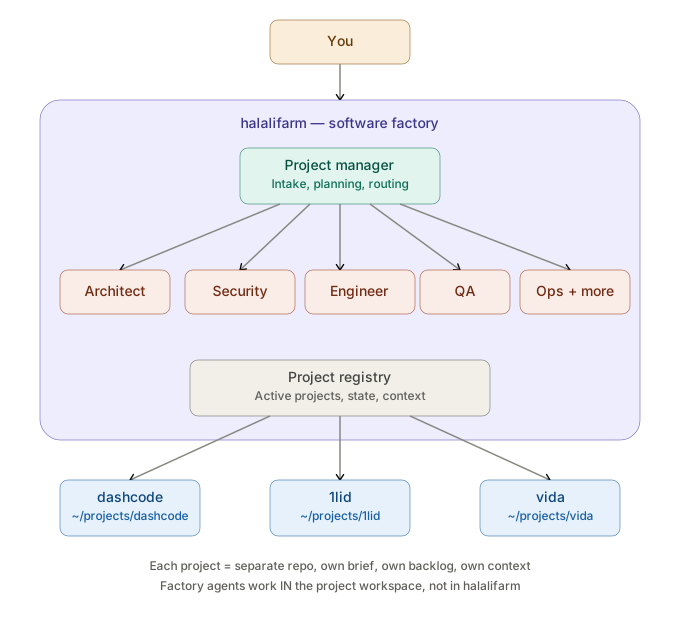
This diagram shows the full picture. You pitch an idea to the factory. The PM agent receives it, consults with SME agents, and produces a plan. The project registry tracks all active projects. And each project lives in its own separate workspace — completely decoupled from the factory itself.
The Self-Improvement Paradox
Once we had this architecture, I raised a question that had been nagging me: if halalifarm is a software factory, and software factories need improvement… shouldn’t halalifarm be able to improve itself using its own process?
Sometimes you work the work. Sometimes you work on the business. And since the business is a product itself, there should be some way to use our own processes to make it better.
The solution turned out to be elegant: halalifarm is just another entry in its own project registry. It’s a project like any other, with its own brief, its own backlog, its own task list. The only difference is a type field:
| |
When agents work on a factory-meta project, they know they’re modifying the factory itself — agent definitions, the registry schema, orchestration logic. When they’re on a product project, they don’t touch any of that.
Think of it like a construction company that renovates its own office. Same blueprinting process, same quality checks, same project management. The only difference is awareness that “we’re working on our own shop right now, so be careful not to knock out a load-bearing wall while we’re standing in it.”
The Key Architectural Decision
The thing that makes the factory/product separation work is physical. Halalifarm never has a src/ directory. It’s pure orchestration — agent definitions, the registry, templates, and commands. The moment any agent starts writing code, they’re doing it in the project workspace, not in halalifarm.
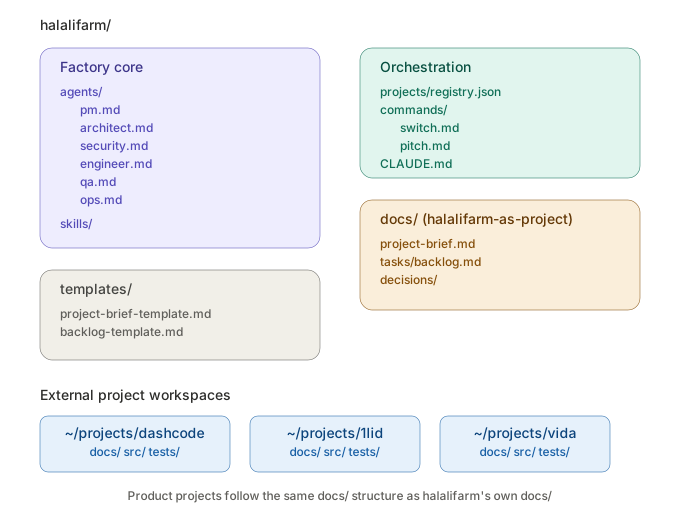
Every product project follows the same directory structure. The templates/ directory inside halalifarm holds the standard layout that gets stamped into every new project. And the agent definitions live at the top level, separate from project-specific work.
This gives you a clean bootstrapping story:
- Now: Work on halalifarm as the active project. Build the PM agent, the registry, the workspace conventions.
- First real test: Switch to whichever existing project is simplest, and have the PM try to onboard it — create a brief, generate a backlog from what already exists.
- Feedback loop: When something doesn’t work, switch back to halalifarm, file a task against the factory, and fix it with the same process.
That third step is where it gets elegant — the factory improves itself using its own workflow, which validates that the workflow actually works.
A Note on Building With Claude
I want to be transparent: this entire architecture was designed in conversation with Claude. Not “Claude wrote it while I watched” — more like a design session with a colleague who has strong opinions and infinite patience.
I’d describe what I wanted. Claude would sketch an approach. I’d push back (“but halalifarm is the factory, not the product”). Claude would reframe. I’d add constraints (“agents need to use different LLM providers”). Claude would adapt.
The diagrams in this series came out of that conversation too — Claude generated them inline as we talked through the architecture, which made it much easier to spot gaps and misunderstandings in real time.
It’s a genuinely useful way to design software. Not because the AI has all the answers, but because explaining your half-formed idea to something that can sketch it back to you forces clarity faster than thinking alone.
In Part 2, we’ll dig into the architectural decisions that had to be right before writing code: the task state machine, multi-provider LLM support with cost tracking, and why your agents should communicate through an append-only message log instead of a shared document.
Continue to Part 2: Decisions That Survive Contact With Code →